

Quality management · EYDEP
Preparing for EYDEP authorisation: see where you stand in advance
A document-based preliminary assessment for manufacturers and special-process companies preparing for EYDEP (a supplier capability assessment programme used by Turkish industry). Mark your processes and upload your documents; the app lists your readiness percentage and the topics that need improvement across six sections (seven for companies that weld).

How does it work?
Your documents speak, not questionnaires
You do not fill in long question lists. You upload the documents you already have; the assessment looks at the content of the documents, their revision and approval information and the record dates. Documents are read on your device and the assessment runs on the server (internet connection required). The result is always an assessment and a recommendation; the final judgement is yours.
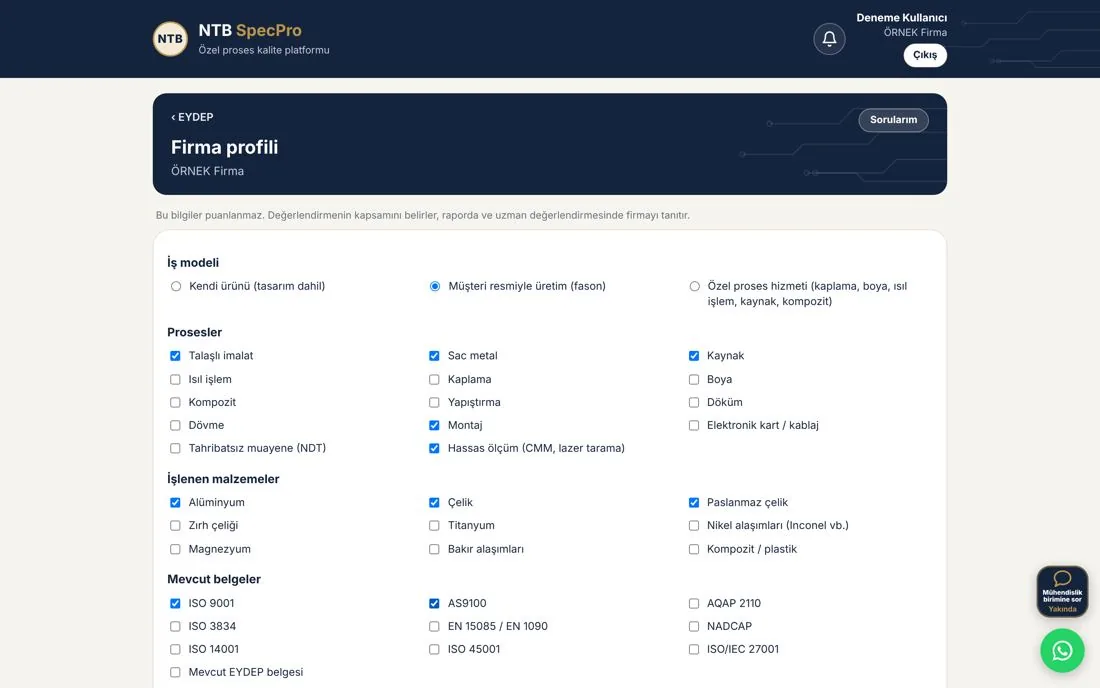
Business model (own product, build-to-print from customer drawings, special-process service), processes, materials, existing documents, machines and equipment, headcount and customers. If welding is marked, the Welded fabrication section is added; for companies providing special-process services, product development topics are skipped.
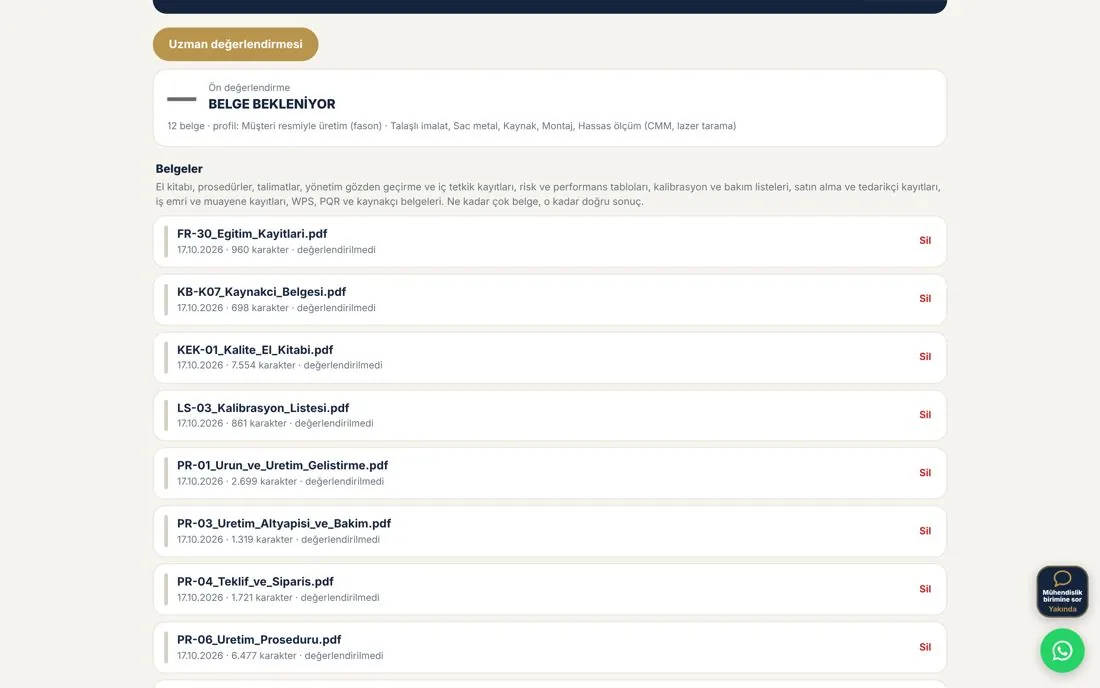
Add procedures, instructions, certificates, calibration records and other records (multiple files). On the phone from the camera and photos; on the computer from PDF, Word (.docx), .txt and .csv files; the text is read on your device. After the assessment you can see whether each document carries revision and approval information. Scanned documents and photos are currently read only on the phone.
The text of your documents is assessed topic by topic on our server; section percentages and the topics that need improvement appear on your screen quickly. The assessment requires an internet connection.
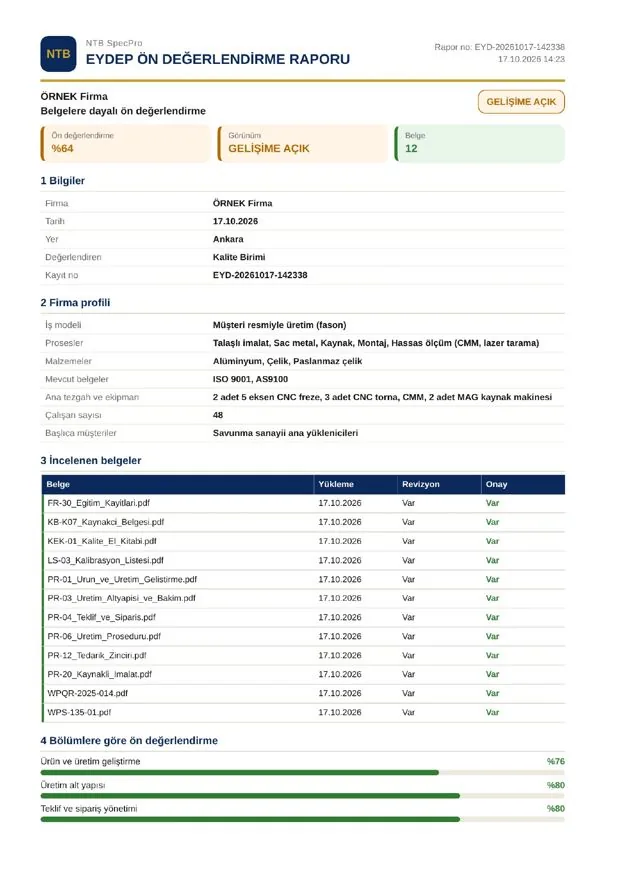
A PDF preliminary assessment report, NTB-sealed on the phone and headed NTB SpecPro on the computer: company profile, documents reviewed (with revision and approval information), section percentages and topics that need improvement; signature field.
If you wish, select your record and send it for expert review with a short note; the documents uploaded to the record are attached to the request automatically, and our process quality engineer who knows the EYDEP processes writes a detailed opinion.
What is assessed?
How does the system assess?
You do not fill in a question list; the system reads your documents and calculates your readiness percentage in six sections (seven for companies that weld). A document-based result is capped at 80%; the rest is completed through on-site verification and expert review. If one section is very weak (below 40%), the overall result is limited to 70%.
Product and production development, production infrastructure, quotation and order, quality management system, production, supply chain; welded fabrication if welding is marked. Sections for work you do not perform are left out of the assessment.
Each document you upload is compared on the server against the system's own topic list. The topic list and check criteria are not displayed; only the result is shown.
If a document has no revision and approval information, if a record that should be current is older than 12 months, or if a document has expired, the score drops. The mere presence of a keyword does not earn points.
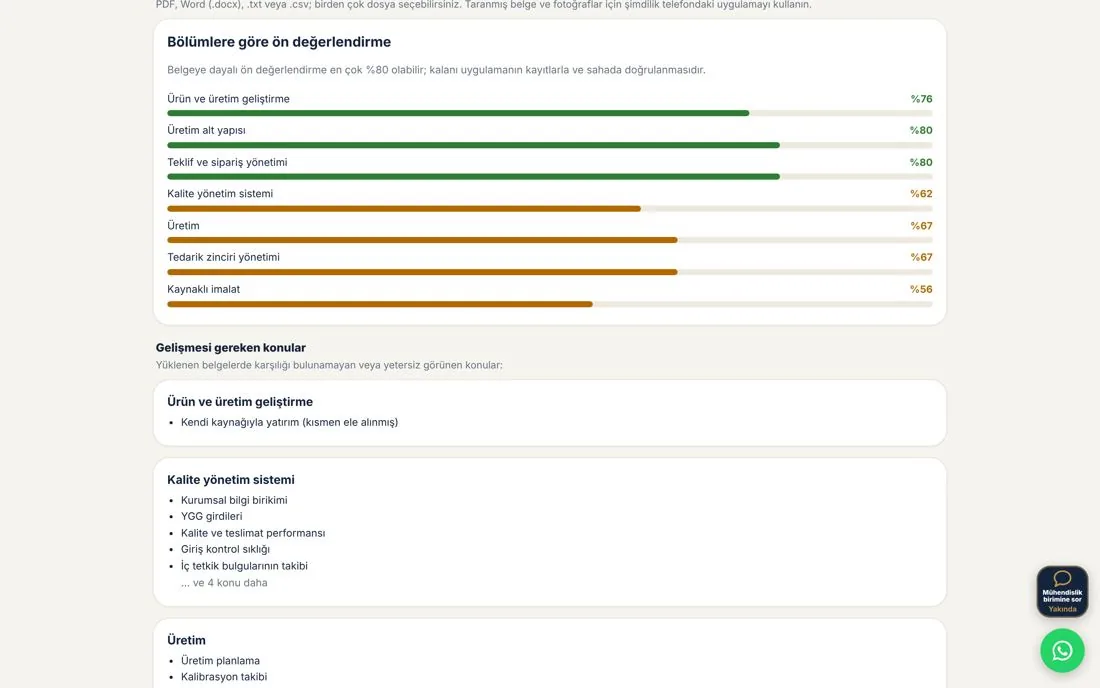
Each section is totalled with its own score weighting; section bars, the overall percentage and the level (Strong, Room for improvement, Weak) are shown on screen.
In each section, the headings of the topics found missing or weak are listed (up to five, the rest as a count); you upload new documents and reassess.
The report is generated on your device; if you wish, you send your record and documents for expert review, and an opinion with recommendations is written topic by topic.
75% and above (as the document-based result is capped at 80%, this means the 75–80% range): documents are largely ready; the remaining points are listed
Between 50% and 75% (orange): some documents are missing or out of date; the topics that need improvement are listed
Below 50%: basic documents are missing; these should be completed first
The assessment topics are NTB SpecPro's own summary prepared from the EYDEP production topics.
Screens
Three steps from the desktop version
Profile, document upload and results screen. The phone app follows the same flow, adding document reading via camera and photo evidence.
PDF report
A preliminary assessment report for your audit file
A PDF preliminary assessment report, NTB-sealed on the phone and headed NTB SpecPro on the computer: company profile, documents reviewed (with revision and approval information), section percentages and topics that need improvement; signature field.
The report is generated and kept on your device; if you wish, you upload it to your company's ERP area with "Export to ERP" or attach it to an expert review request. If your company enables the optional AI assistant in the ERP, a summary of the relevant records is sent to a US-based AI service to answer your question when you ask one; it is off by default. If you enable the optional AI helper, the report and document text, and when you ask for a "Second opinion" on a photo review only that photo, are sent to a US-based AI service to generate the answer; it is off by default and can be switched off at any time.
Expert review
The app does the preliminary assessment; our experts take it deeper
Attach your documents, company profile and section results to an "Expert review" request. Our process quality engineer who knows the EYDEP processes examines your package and writes an opinion with recommendations topic by topic; the reply arrives inside the app and the bell icon notifies you.
- ✓Your documents and records are reviewed personally; the content is assessed, not just keywords
- ✓Concrete corrective suggestions for the points most often raised in audits
- ✓The reply and its attachments are kept on the My Questions page; the report is also sent to your e-mail
- ✓The fee is shown on the request form or communicated by e-mail after your request has been reviewed; payment details arrive by e-mail
The documents uploaded to the record and the files you attach (10 in total at most), the company profile, the overall and section percentages, and your note. No document file reaches us unless you send it; during the assessment only the document text goes to the server, and it is not stored.
Our process quality engineer who knows the EYDEP processes. Confidentiality: at NTB SpecPro the package is seen only by the reviewing engineer and is not shared with third parties. Under a company membership, the request also appears in the My Questions list of your company's own users.
Reassess as you close out actions; contact us for site visits and pre-audit preparation support.
On phone and computer
Phone on the shop floor, computer in the office; one account
You work on phone and computer with the same account. Assessment records are kept on the device where they were created; they are not synchronised between phone and computer. Use the phone for scanned documents and photos, the computer for PDF and Word files. The desktop version needs no installation; it opens in the browser.
You sign in to the app and the desktop version with your ntbspecpro.com account; under a company membership, your administrator adds the users.
The account is linked to one phone; on the computer, a single session stays open at a time. On a new computer you are asked for the 6-digit code sent to your e-mail.
Via the "Open on computer" link on the My Account page, or directly at ntb-specpro.web.app (opens in a new tab).
Data confidentiality
Your documents stay on your device; only text goes to the server
The documents of aerospace suppliers often cannot leave the company. In this module the image and file of each document stay on your device; for the assessment, only the document text, the document name and the company profile selections are sent to our server; they are processed only during the assessment and are not written to a database, file or log. Document texts and the original files are stored on your device together with the record so that they can be attached to an expert review; they are deleted when you delete the record.
- ✓Document files and photos stay on your phone or computer; they are not uploaded to the server (unless you attach them to an expert review request or to the ERP)
- ✓Text is extracted on your device; the text sent to the server is processed for the assessment, not stored and not logged. If you switch on the optional AI helper, report and document text is also sent to our AI service provider (USA); see the Privacy Policy.
- ✓The server runs on Google Cloud (EU – Belgium); the account and membership infrastructure is Google Firebase
- ✓Documents reach us only if you attach them to an "Expert review" request and send it; even then only the reviewing engineer sees them
- ✓No model training is done with customer documents
Details: Privacy policy
What is kept where?
| Data | Location |
|---|---|
| Document files, photos, site evidence | On your device |
| Document text, document name, profile selections | On the server only for the duration of the assessment; not stored |
| Document texts and copies of the original files | On your device (phone or browser), together with the record |
| Section percentages, action plan, PDF report | On your device |
| Account, membership and session information | On our server (Google Firebase) |
| Expert review package (including documents) | On our server, only if you send it |
Membership
Individual
One quality engineer, one phone and one computer. Monthly or annual membership; the first 14 days are free.
Current prices →Membership
Company
Per-person pricing (minimum 5 people); your quality team works under the same company record. Contact us for a pilot.
Company prices →Try it now
Open an account, upload your documents
From the My Account page you open the Android app and the desktop version. For pre-audit consulting, our WhatsApp support line and info@ntbspecpro.com.