

Welding module · In use
Manage weld quality from photo to report in a single app
Visual inspection, document check, drawing reading and macro examination; evaluation against ISO/EN or AWS standards and a PDF report. Works on phone and computer with the same account, and your records and photos are stored on your device.
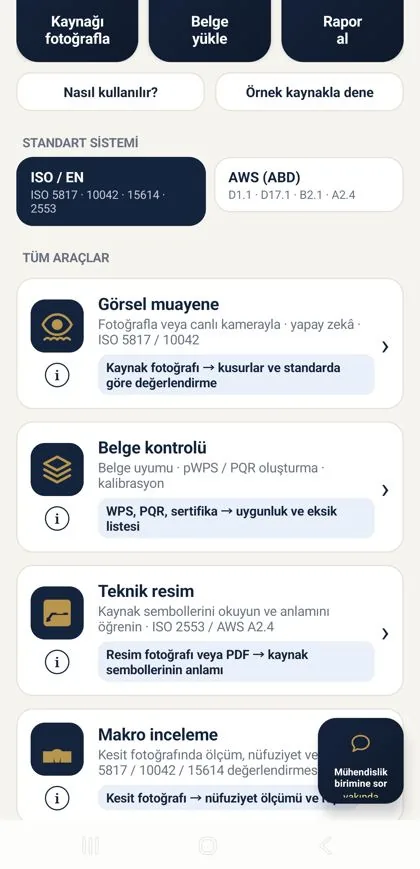
On phone and computer
Phone in the field, computer in the office; same account, same records
You take photos on your phone in the field; in the office you prepare documents, drawings and reports on a large screen from your computer with the same account. The desktop version needs no installation and opens in the browser.
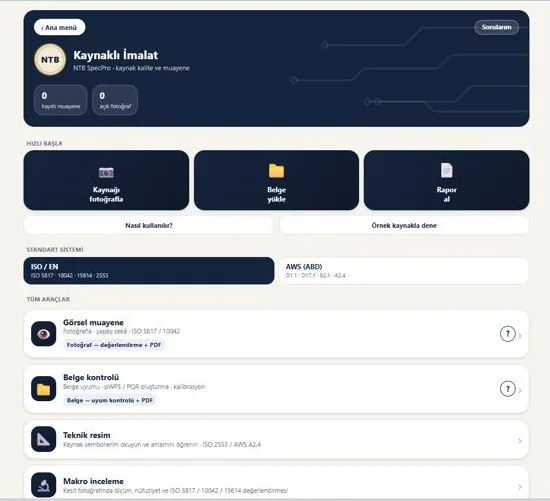
You sign in to the app and the desktop version with your ntbspecpro.com account; the subscription is valid on both.
The account is linked to one phone; on the computer only one session stays open at a time. On a new computer you are asked for the 6-digit code sent to your e-mail.
Via the "Open on computer" link on the My Account page, or directly at ntb-specpro.web.app (opens in a new tab).
Four tools
All weld quality tasks, from visual inspection to macro section
Quality staff select the standard family (ISO/EN or AWS) and the app guides them step by step. Results are presented as an evaluation and recommendation; the engineer always has the final say.
Free tools: Heat input · Carbon equivalent · Consumable weight · Welder qualification expiry
Visual inspection
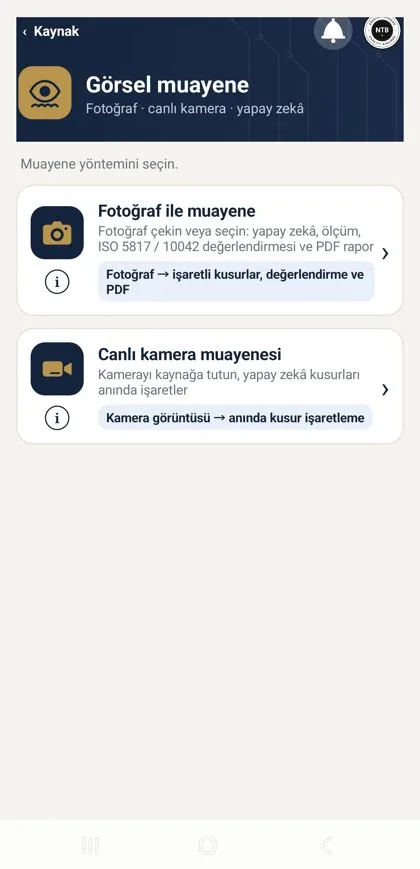
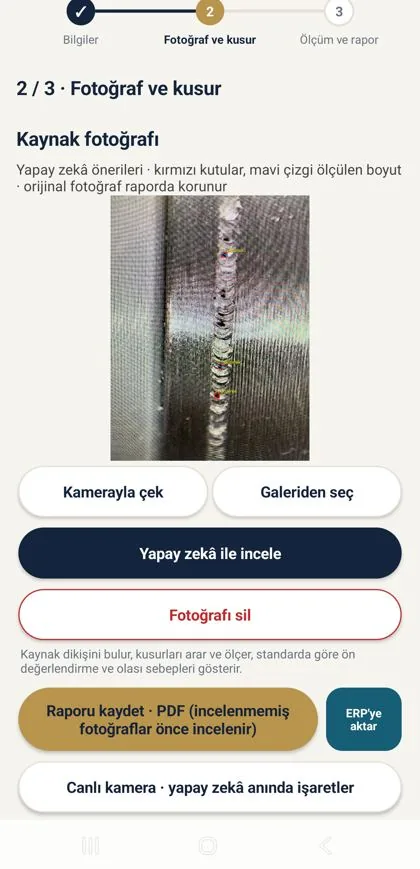
Take a photo of the weld seam or examine it with the live camera; the AI marks imperfections and classifies them according to the selected standard.
- ✓Photo and imperfection: porosity, incomplete penetration, undercut, suspected cracks and similar imperfections are marked on the image
- ✓Evaluation against the quality level (ISO 5817 B/C/D, ISO 10042 or AWS acceptance criteria)
- ✓Low-confidence findings are shown separately as "possible, please check"; the app does not make the decision, it supports the engineer
- ✓The result becomes a Weld inspection report PDF with a single tap
Document check
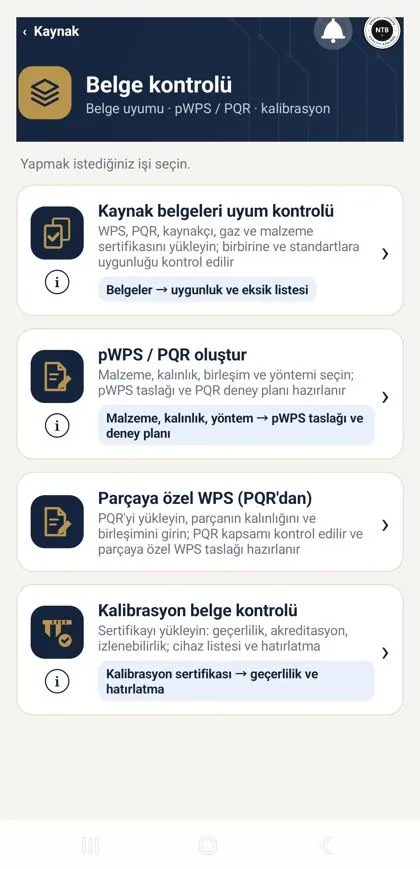
Upload WPS, PQR, welder certificates and calibration records; the app lists what is missing, expired or non-compliant.
- ✓Document compliance: the uploaded WPS/PQR/certificate is checked against the selected standard
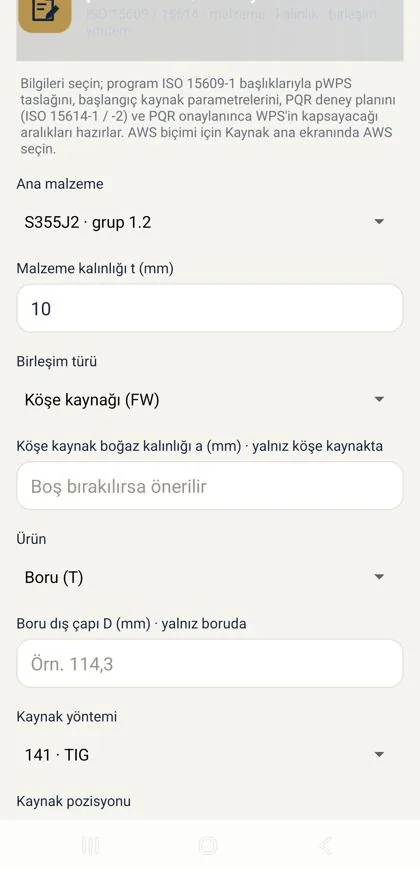
- ✓pWPS and PQR creation: enter material, thickness, process and position; the preliminary WPS draft and PQR test plan are ready
- ✓Part-specific WPS: a WPS draft for the part from the symbols read off the drawing
- ✓Calibration tracking: calibration dates of measuring instruments and machines
Drawing
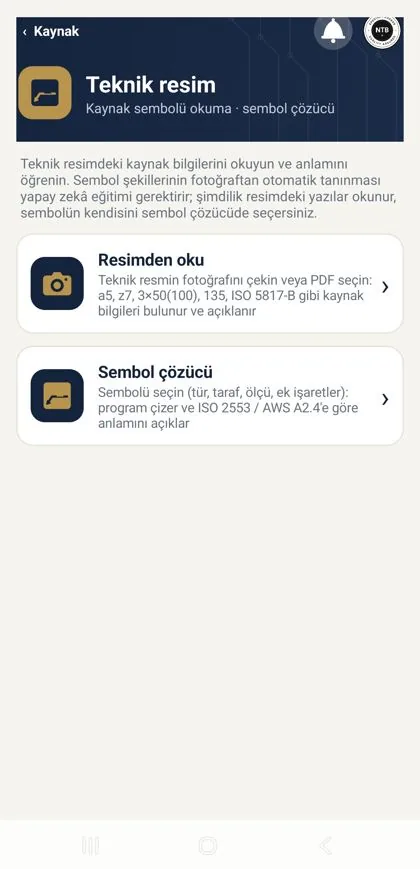
Take a photo of the drawing; the welding symbols are read and their meaning explained (ISO 2553 / AWS A2.4).
- ✓Read from drawing: symbols, dimensions and notes are extracted from the image
- ✓Symbol decoder: the meaning of the symbol, weld type, size and surface finish in plain language
- ✓The information read can be transferred directly into the part-specific WPS draft
Macro examination
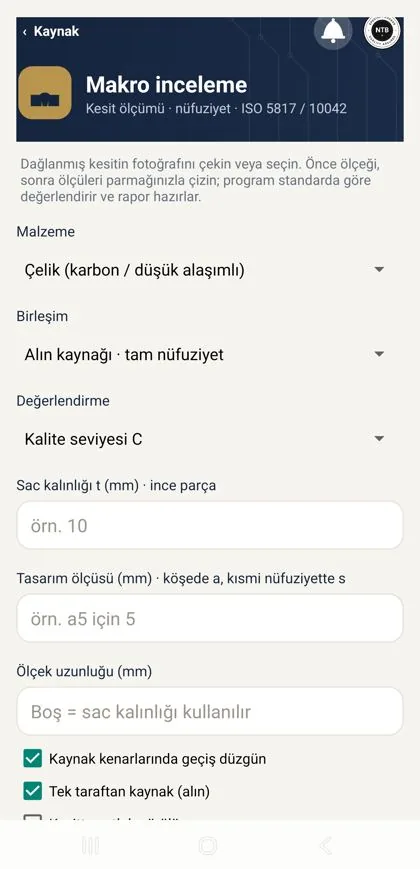
Penetration, weld geometry and internal imperfections are measured on the macro section photo and evaluated against the requirements of ISO 5817 / 10042 / 15614.
- ✓Enter the thickness and scale; the measurements are taken automatically on the image
- ✓Penetration, excess weld metal, toe angle and internal imperfections are listed
- ✓The result is entered into the PQR test plan and the report
Reports
PDF reports for your audit file
Every evaluation turns into a PDF report you can hand to your customer or the auditor. Reports are generated on your device and sent to e-mail or the ERP with a single tap.
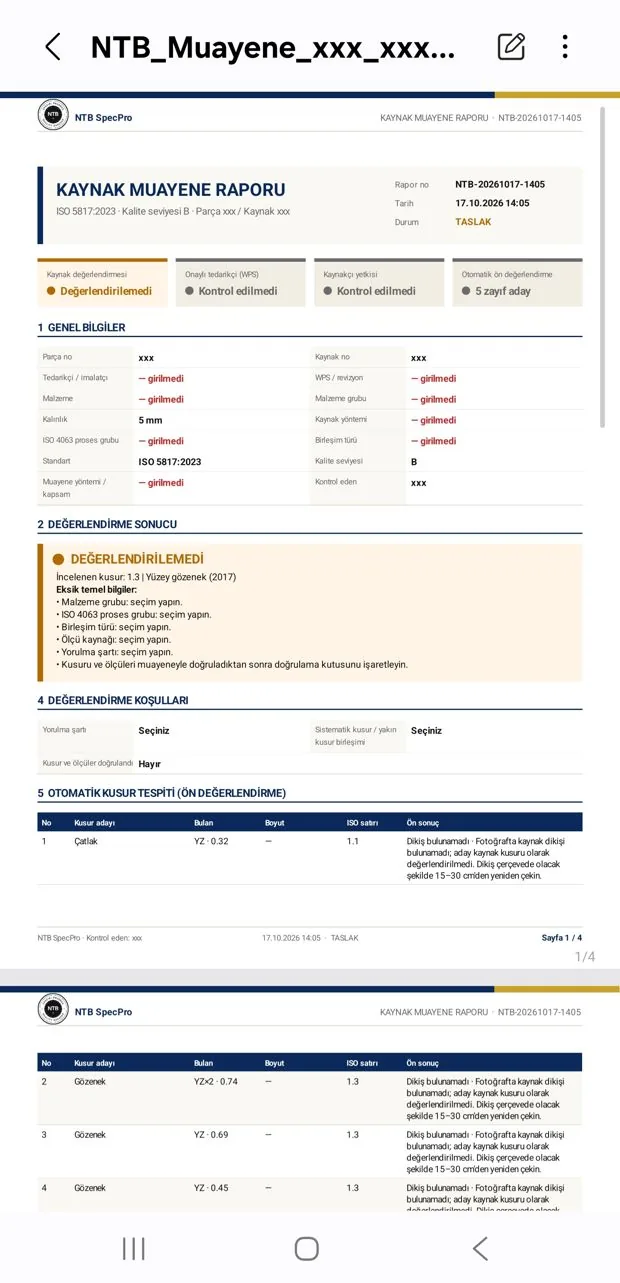
Photo, marked imperfections, standard and quality level, evaluation, signature field
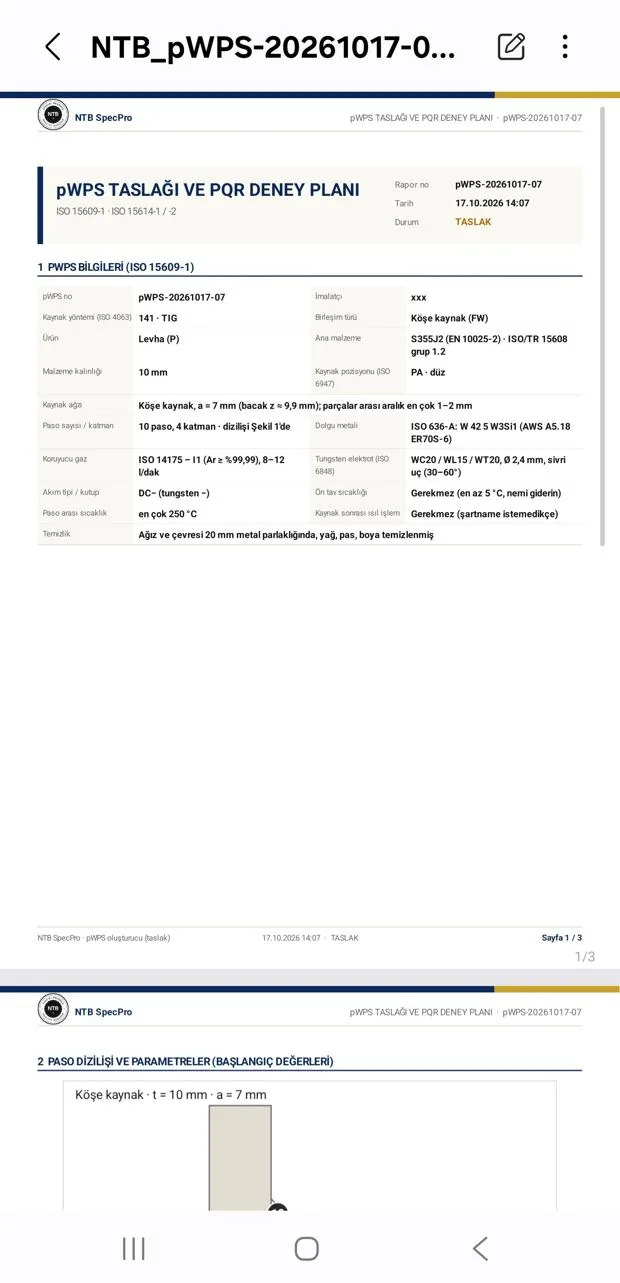
Parent metal, filler, process, position, preheat and interpass temperature
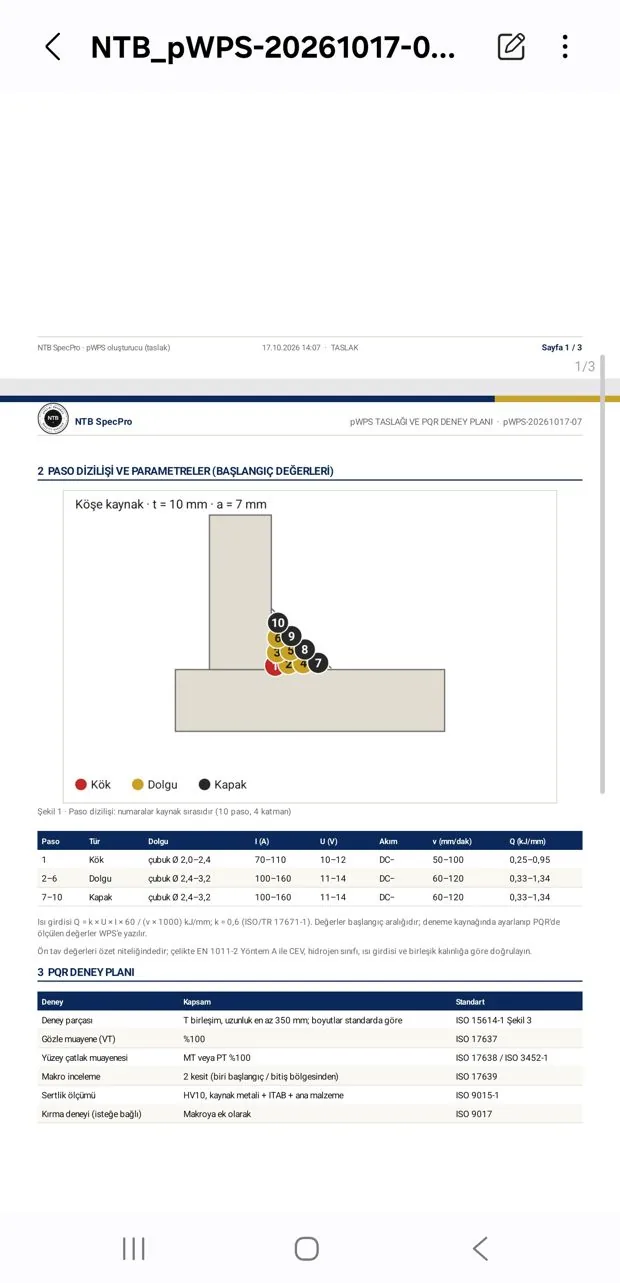
Joint preparation, pass sequence, current, voltage, travel speed and heat input tables
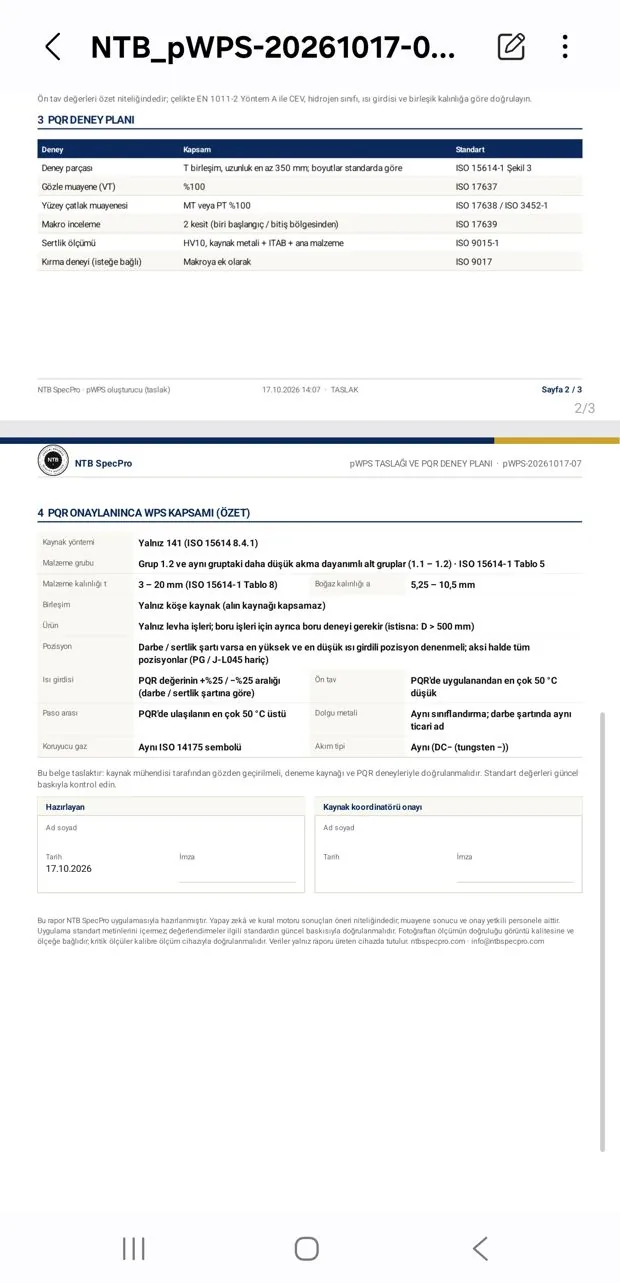
Tests required by ISO 15614-1, number of specimens, ranges of qualification, approval lines
Online welding engineer support
A welding engineer behind you whenever you get stuck
The app cannot answer every question; that is why the module has an Ask the engineering team button. Write your question and attach a photo, WPS or drawing; our online welding engineer replies inside the app, and the bell icon notifies you when the answer arrives.
- ✓Major defects and imperfections: send the photo and learn what the imperfection is and how to fix it
- ✓Topics you are unsure about: standard clauses, quality levels, symbol meanings, test requirements
- ✓Preparing WPS, PQR and welder certificates, and pre-audit checks
- ✓Everything about welding: material selection, distortion, welding after heat treatment, repair welding
- ✓Answers are kept on the app's "My questions" screen; you can always go back to your past questions
The fee per question is shown in the app; answers are engineering opinions and recommendations, and the final evaluation is yours.
Ask with a photo of the seam and the applicable standard; our engineer writes back with the imperfection, the relevant acceptance limit and what can be done.
State the material, thickness and process; get a recommendation for consumable, preheat and interpass temperature.
Attach the WPS and PQR; learn the missing or non-compliant points and how to correct them.
How does it work? Four steps
engineering team
The "Ask the engineering team" button at the bottom right of the Welding module is with you on every screen.
Attach the imperfection photo, WPS, PQR or drawing; state the standard and material.
Your question goes to our online welding engineer, who asks for more information if needed.
The bell icon notifies you; the answer and its attachments are kept on the "My questions" screen, and you can ask again whenever you wish.
Data confidentiality
Your photos and documents are processed on your device by default
(they leave it only if you choose to send them)
Part photos, drawings and WPS can be trade secrets; in aerospace and industrial projects they usually cannot leave the company. NTB SpecPro was designed with this requirement in mind from the start.
- ✓In the Welding module, photo, document and macro evaluation is done on the device itself; images and documents are not uploaded to our servers. Exceptions: if you ask for a 'Second opinion' on a photo, only that photo is sent to a US-based AI service to generate the answer, and we do not store it; the optional AI helper and reports you export to the ERP are described below.
- ✓The AI models are downloaded to the device once and run offline; no internet is needed during inspection.
- ✓The server keeps only account, subscription and session information plus usage counts such as how many times the app was opened; no content is kept (except reports you transfer to the ERP, which are stored in your company's ERP area). If your company enables the optional AI assistant in the ERP, a summary of the relevant records is sent to a US-based AI service to answer when you ask a question; it is off by default. If you enable the optional AI helper, report and document text, and when you ask for a "Second opinion" on a photo inspection only that photo, are sent to a US-based AI service to generate the answer; it is off by default and can be switched off at any time.
- ✓A photo or document reaches us only if you attach it to a "Technical question" or "Expert evaluation" request and send it.
- ✓The models are trained on openly licensed data sets and photos we take ourselves; no training is done with customer photos.
Details: Privacy policy
What is kept where?
| Data | Location |
|---|---|
| Weld photos, macro images | On your device |
| WPS, PQR, certificates, drawings | On your device |
| AI evaluation and PDF reports | On your device |
| Account, subscription and session information | On our server (Google Firebase) |
| What you send for a technical question or expert evaluation | On our server, only if you send it |
| Inspection records and PDF reports you transfer to the ERP | In your company's ERP area (Google Firebase), only if you transfer them |
| The photo for which you ask for a "Second opinion" | A US-based AI service, only if you ask; not stored by us |
Subscription
Individual
One user: one phone plus one computer session at a time. Monthly or annual subscription; the first 14 days are free.
Current prices →Subscription
Company
Per-user pricing (minimum 5 users); the company administrator adds users themselves. Write to us for a pilot.
Company prices →Try it now
Open an account, install the app
From the My Account page you open the Android app and the desktop version. For questions, our WhatsApp support line and info@ntbspecpro.com.